




D365 F&O Licence Cost Optimiser
Cut your D365 F&O licence bill with precision, in 48 hours
We built an engine that replicates how PPAC calculates your D365 F&O licence consumption. That gives us exact visibility of what’s driving your licence costs and how to cut them.
- Typically 10–30% off your D365 F&O licence bill
- Every client saved more than the assessment fee
- Savings simulated before you touch production
- No code deployment, no system access, no risk
We Are trusted by Companies Like


One engine, three services
Start with clarity. Cut costs. Stay in control.
To gain clarity fast
Fragmentation Report
What it is: High-level analysis of roles and licence fragmentation
Intended audience: Stakeholders who need clarity on their licence position
Use case: Initial high-level assessment
Deliverable: PDF report
Features

Users analysis

High-level roles analysis
High-level profiles analysis
High-level licence analysis
High-level costs analysis
Custom roles mapping
Cost savings simulator
Recommended actions for cost cutting
Fixed price
Credited in full towards the cost of the Full Assessment
To cut licence costs
Full Assessment
What it is: Complete licence analysis with quantified savings opportunities
Intended audience: Stakeholders and technical experts who need to cut licence costs
Use case: One-off licence cost review exercise
Deliverable: PDF report + supporting Excel document
Features

Users analysis
Detailed roles analysis
Detailed profiles analysis
Detailed licence analysis
Detailed costs analysis
Selected custom roles mapping
Cost savings simulator
Recommended actions for cost cutting
Priced based on complexity
Depending on the number of your users and roles
To monitor changes
Role Scan
What it is: Role-object-licence mapping for all your custom roles
Intended audience: Technical experts who know how to modify security roles
Use case: Recurring monitoring for incremental changes
Deliverable: Single Excel sheet
Features
Users analysis
Roles analysis
Profiles analysis
Licence analysis
Costs analysis
Full custom roles mapping
Cost savings simulator (available as extra)
Recommended actions for cost cutting (available as extra)
Priced per run
Based on number of runs, with cadence tailored to your needs
Discover how it works
No complications, no long engagements. A clear four-step process.
01
Free demo
A short call to show you how it works and get your questions answered.
02
Data extraction
We guide you to export selected system tables. You stay in control of your D365 F&O environment at all times.
03
Analysis
We run the numbers, analyse the data, and deliver your results — typically within 48h.
04
Review call
We walk you through the findings, discuss where the savings are, and prioritise the fastest ways to cut costs.
The same process applies whether you’re running a Fragmentation Report, Full Assessment, or Role Scan.
What’s in the Full Assessment?
We replicated the Microsoft’s licence calculation algorithm outside of D365 F&O. With our LCO engine, we bring you the most accurate, transparent, and comprehensive analysis of your security setup and licence consumption. With objective, data-driven recommendations you can act on immediately to cut costs.
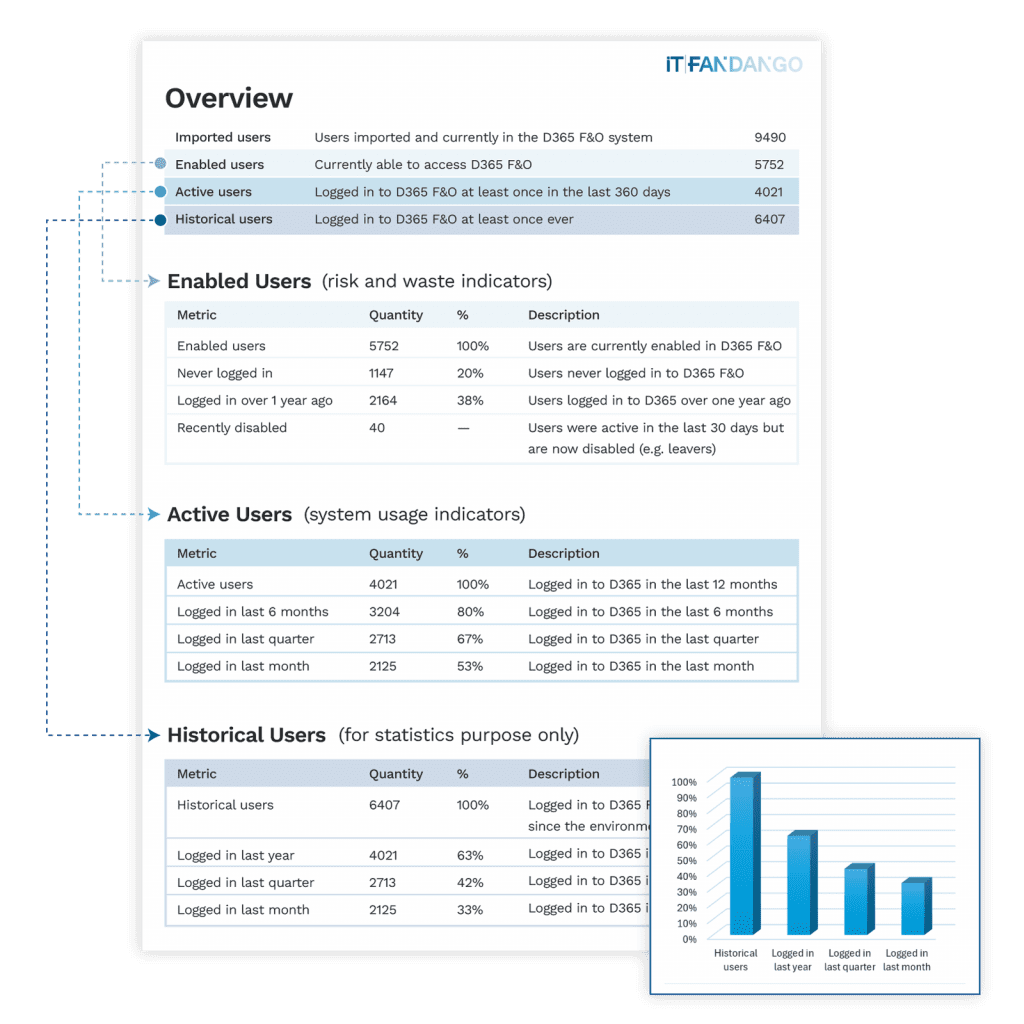
Users summary
Licence waste
See how many enabled accounts have never logged in or have been inactive for over a year — easy savings with minimal disruption.
Enabled vs active vs historical users
Quantify the gap between licences you’re paying for and those actually being used, yesterday and today.
Clear breakdown
See all KPIs that matter at a glance, without a need to dig into the D365 F&O application.
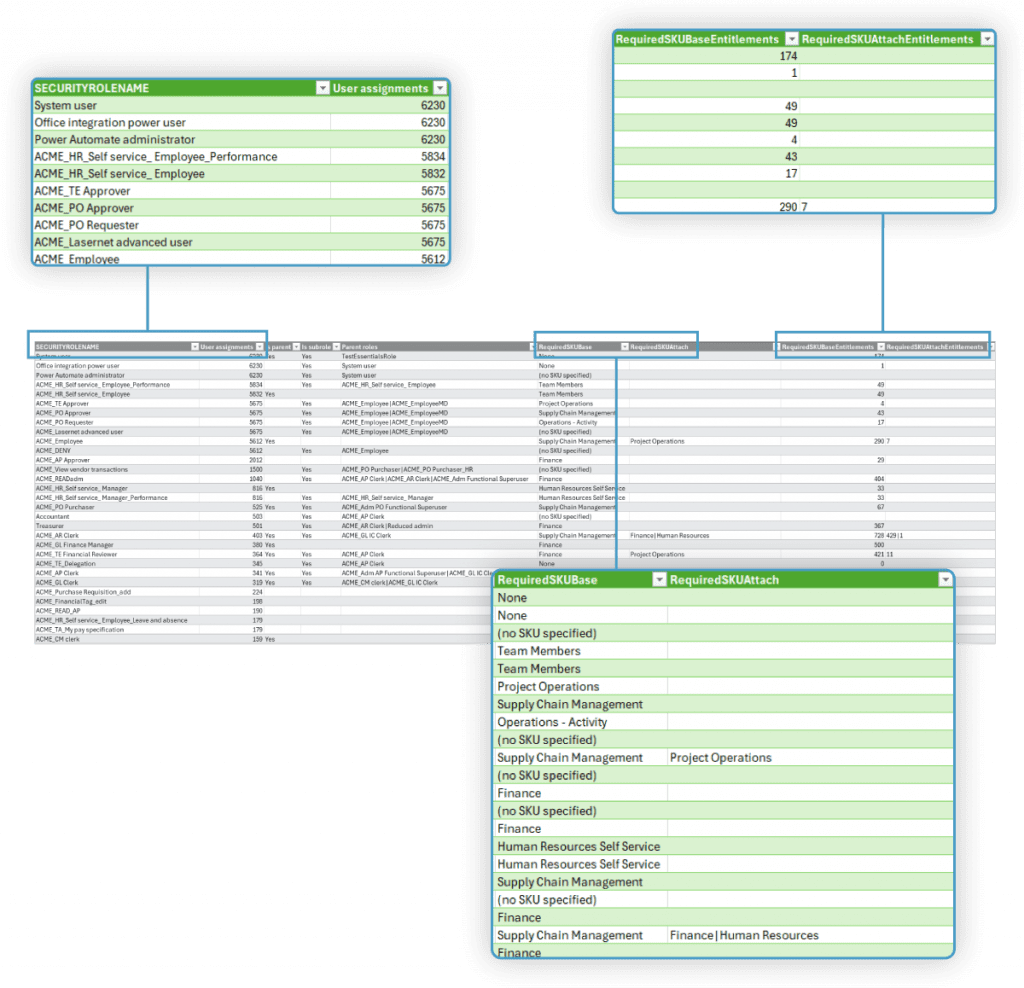
Roles breakdown
Top cost drivers
Roles ranked by user assignments, so you know exactly which ones have the biggest impact on your final licence count.
Licence mapping
For each role, see the required base licence and any attaches it pulls in — no need to guess or switch between multiple forms.
Optimisation targets
See exactly where just a few entitlements trigger an expensive attach licence for each role, so you know where to focus your efforts.
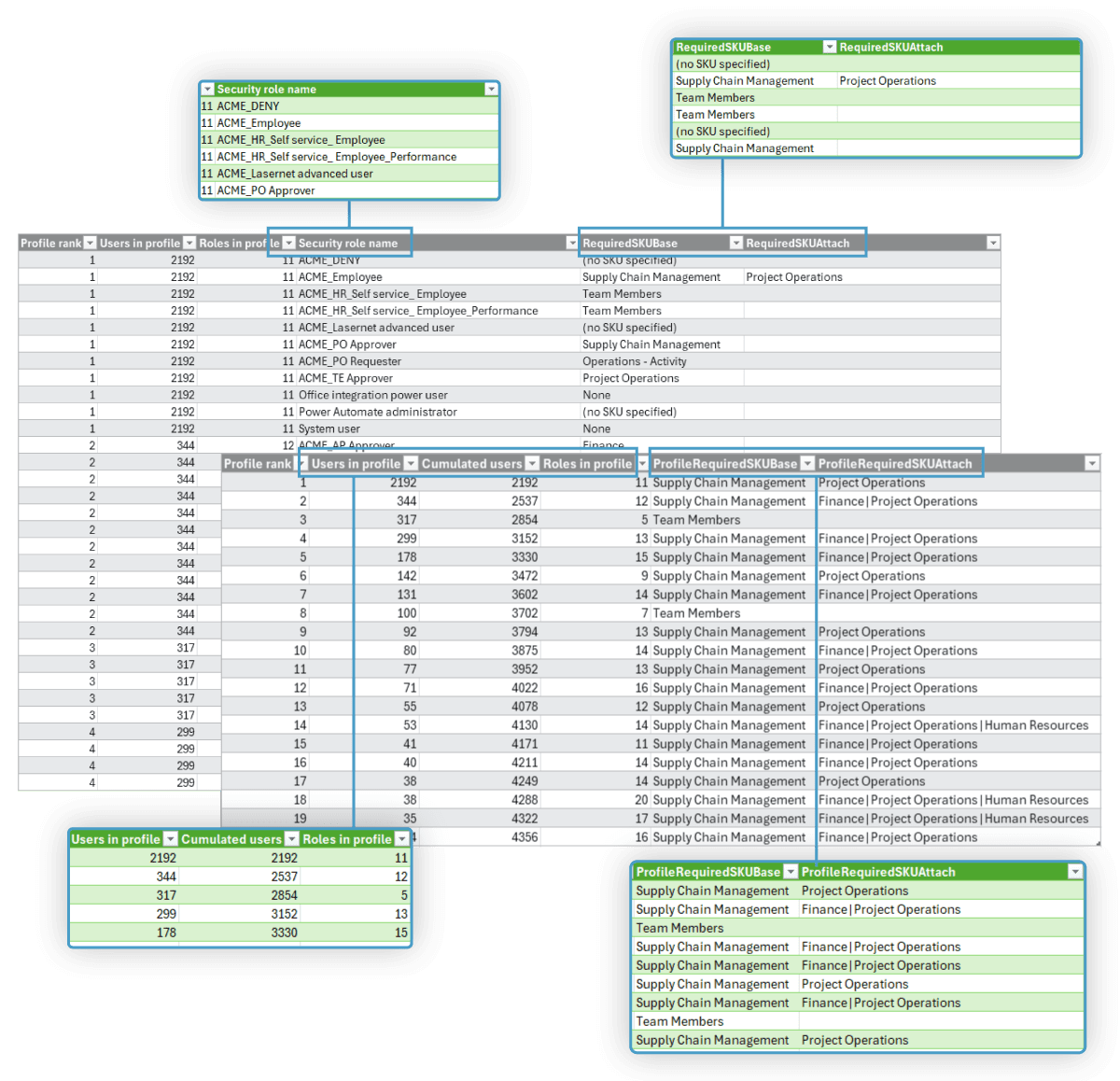
Profiles summary + breakdown
Most common profiles
See clearly the most common groups of users with the same set of roles attached — the real cost drivers, filtering out the noise.
Licence footprint
For each profile, see the number of users in it, roles assigned, and licences consumed.
Data-driven insight
Uncover the top 10 profiles as a summary with user-level licence, plus a breakdown with roles details for each — no need to guess.
Licences comparison + savings
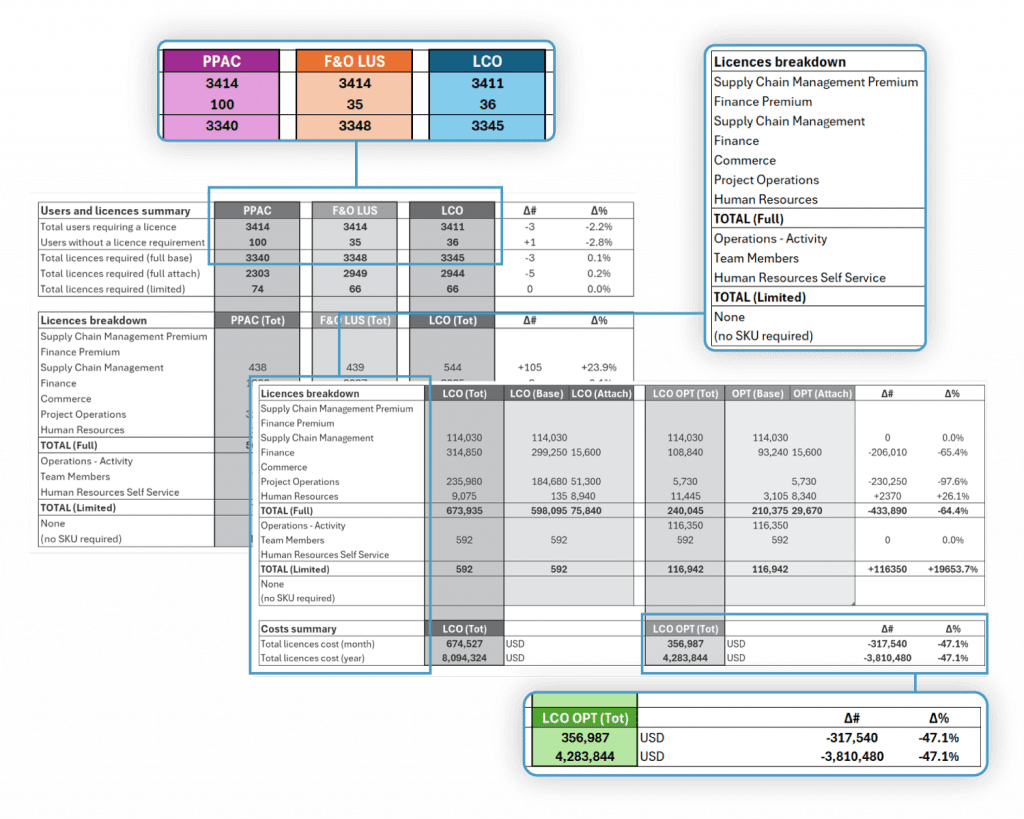
Three-way validation
Compare PPAC actuals against F&O and our calculator side-by-side — see exactly where Microsoft’s own systems disagree and validate our calculations against both.
Clear licence breakdown
See the exact split between base licences and attaches for every SKU — complete transparency on how each licence type contributes to your total costs.
Instant savings simulation
See immediately how much money role optimisations will save with our what-if scenario — quantify the ROI before making any changes in your environment.
Need something different?
The right choices if you need clarity to begin with, or need control over your security roles.
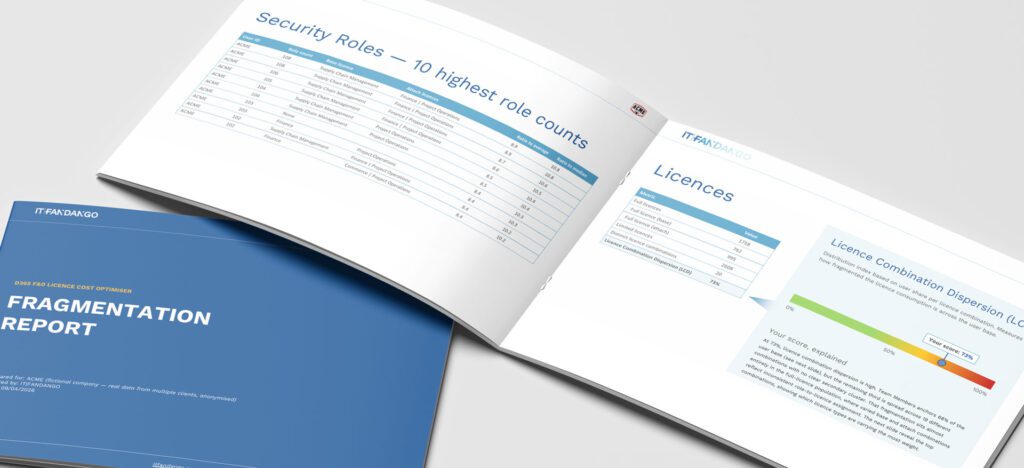
Fragmentation Report
Where do you stand?
Three indices measure role accumulation, profile diversity, and licence dispersion — giving you an objective picture of your environment in one report.
Your cost baseline
See your licence split, estimated annual cost, and the top 10 combinations driving your spend — before committing to a full analysis.
A clear next step
See your licence split, estimated annual cost, and the top 10 combinations driving your spend — before committing to a full analysis.
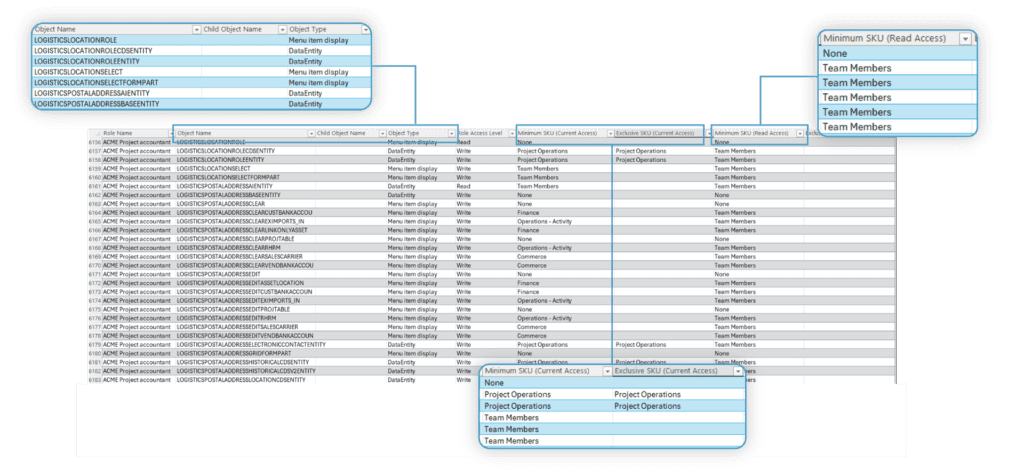
Role Scan
Every custom role, mapped
See all your custom security roles object by object — with the exact licence each object triggers, and what changes if access is reduced to read-only.
Know before you change
Identify which objects drive expensive licences in each role, so your team can act with precision rather than guesswork.
Built for ongoing monitoring
Microsoft updates licence metadata without notice. Run the Role Scan on your cadence to catch changes before they cost you.
Why clients choose us
No code deployment. No learning curve. Answers in 48 hours.

Microsoft (PPAC/F&O)
| Code deployment to PROD | Not needed |
| Timeline for answers | Weeks to months |
| Client effort required | High, manual data search required |
| Risk of access to sensitive data | None |
| Identification of licence cost drivers |  Partial, showing what licences but not why Partial, showing what licences but not why |
| List of surgical changes to realise savings | No |
| Cost-savings simulator before any changes to PROD | No |
| Cost savings realised | None, risk of overpaying for licences |

Competing solutions
| Code deployment to PROD | Yes, extensive in some cases |
| Timeline for answers | Days to weeks |
| Client effort required | High, maintaining and learning the product |
| Risk of access to sensitive data | Potential |
| Identification of licence cost drivers | Partial at best |
| List of surgical changes to realise savings | Partial at best |
| Cost-savings simulator before any changes to PROD | No |
| Cost savings realised | 30% (claimed) |

Licence Cost Optimiser
| Code deployment to PROD | Not needed |
| Timeline for answers | 48h |
| Client effort required | Minimal, data export only |
| Risk of access to sensitive data | None |
| Identification of licence cost drivers | Yes, with mathematical accuracy |
| List of surgical changes to realise savings | Yes, with mathematical accuracy |
| Cost-savings simulator before any changes to PROD | Yes, with mathematical accuracy |
| Cost savings realised | 8.8% – 47.3% (verifiable with testimonials) |


What our clients say
Their words about our results say more than we ever could.
Woolpert spent over eight months working through Microsoft’s evolving licensing changes to reduce costs, with limited success. IT Fandango’s LCO and simulation analysis were incredibly detailed and precise, giving us immediate clarity. As a result, we were able to reduce costs by nearly $500,000/year in just a few days of work.

Carl Lucas
CIO at Woolpert
IT Fandango’s licensing analysis helped us quickly identify the most impactful cost savings opportunities in our D365 F&O environment, preventing a significant amount of unnecessary licence spending. Their insights provided a solid foundation for our internal review, enabling us to align licensing more closely with business needs while maintaining functionality and user productivity.

Čedomir Jokanović
Technology Director at NEPI Rockcastle


Ready to start? Book a demo to see how it works
FAQs
Answers to the most common questions we received. Still having doubts? Book a free demo and we’ll clear your doubts.
On our largest client dataset of 10,000+ licences, we achieved 99.7% on base licences and 98.8% on attach licences. Now we routinely achieve >99% accuracy on any dataset, and we continue to analyse Microsoft’s algorithm to refine our engine.
Yes. Custom and standard roles are treated the same; both are fully supported. We also flag roles that don’t trigger any licence and those mapped to the licence “None”. These two cases are not displayed by Microsoft, but are visible in our analysis.
100% of our clients saved more money in licences than what they paid for the assessment. We pinpoint the cost drivers of your licence spend with data-driven certainty, then we recommend role changes that cut the most spend with the least business disruption. Actual savings depend on the changes you decide to implement. We will assist your decision-making process as necessary.
Our clients typically save between 10% and 30%, though some have achieved over 45% before any major role redesign. This is because targeted small changes can have massive cost saving effects if you know where to look — we do.
No. The Licence Cost Optimiser runs entirely outside D365 F&O and it’s our IP. Nothing is installed — you simply export the relevant system tables for us, and we take it from there.
No. You always stay in full control of your environment. We never connect to your system. We guide you through a one-time export of a handful of security tables, and that’s all we need. You may decide to share your current PPAC licence totals and current prices for a comprehensive picture, but that’s optional.
No. We only require data from selected system tables in the security setup area (users, roles, objects, etc.). We do not need any transactions or similar. If your usernames contains personal data, we will show you how to anonymise them before you share it with us.
Usually within 48h. Extremely large environments or complex environments (e.g. hundreds of custom roles, multiple tenants) may occasionally take longer. If that’s the case, we will let you know in advance.
Yes. We can support remediation and governance as a follow-on engagement.
Stop wasting money on unnecessary Microsoft licences.
Get your D365 F&O Licence Cost Optimiser report and uncover immediate savings opportunities. Book a free 30-minute demo below to see how it works and how we helped clients like you.

Marco Romano
D365 F&O Independent Advisor
We aim to deliver the report within 48 hours of receiving the required data.
If we anticipate any delays due to unusual data complexity, we will let you know upfront.